Forums GAMERGEN
Prise Ecouteur pin's Psp Fat
Règles du forum
Avant de poster votre sujet lié au jailbreak de votre console. Merci de consulter l'univers undeground PSP.
Cette section reste soumise aux règles du forum, aucun contenu warez, illégal et dangereux n'est toléré.
Avant de poster votre sujet lié au jailbreak de votre console. Merci de consulter l'univers undeground PSP.
Cette section reste soumise aux règles du forum, aucun contenu warez, illégal et dangereux n'est toléré.
Voir le premier message non lu • 7 messages
• Page 1 sur 1
Prise Ecouteur pin's Psp Fat
 par Sani300 » 08 Juil 2009, 14:18
Salut!
Je voulais savoir si sur la prise ecouteur donc les 6 pin's qui se trouvent a coté sont toute utilisées?!
Sani300
Je voulais savoir si sur la prise ecouteur donc les 6 pin's qui se trouvent a coté sont toute utilisées?!
Sani300
Vous voulez gagné des Ipod touch 8,16,32 Go ou même des Mac, des consoles facilement et assez rapidement? Juste en répondant a une question chaque jour!
Alors demandez moi une invitation pour vous inscrire sur lockez.com (MP moi)
Alors demandez moi une invitation pour vous inscrire sur lockez.com (MP moi)
-
 Sani300
Gamer Maitre
Sani300
Gamer Maitre
- Messages: 367
- Inscription: 29 Juin 2009, 21:59
Re: Prise Ecouteur pin's Psp Fat
par Sani300 » 08 Juil 2009, 19:31
Ba pour brancher la telecommande mais la telecommande n'utilise pas tous les ports!
Et puis ne dis pas ça regarde sur les rechargeur de telephone portable a chaque fois presque tu te retrouve avec une prise a 50 pin's et il n'en utilise que 5 maxi!
Et puis ne dis pas ça regarde sur les rechargeur de telephone portable a chaque fois presque tu te retrouve avec une prise a 50 pin's et il n'en utilise que 5 maxi!
Vous voulez gagné des Ipod touch 8,16,32 Go ou même des Mac, des consoles facilement et assez rapidement? Juste en répondant a une question chaque jour!
Alors demandez moi une invitation pour vous inscrire sur lockez.com (MP moi)
Alors demandez moi une invitation pour vous inscrire sur lockez.com (MP moi)
-
Sani300
Gamer Maitre
- Messages: 367
- Inscription: 29 Juin 2009, 21:59
Re: Prise Ecouteur pin's Psp Fat
par Sani300 » 08 Juil 2009, 20:02
Euh pour la fat ça ne focntionne pas :s c'est justement celui dont j'ai besoin
Vous voulez gagné des Ipod touch 8,16,32 Go ou même des Mac, des consoles facilement et assez rapidement? Juste en répondant a une question chaque jour!
Alors demandez moi une invitation pour vous inscrire sur lockez.com (MP moi)
Alors demandez moi une invitation pour vous inscrire sur lockez.com (MP moi)
-
Sani300
Gamer Maitre
- Messages: 367
- Inscription: 29 Juin 2009, 21:59
Re: Prise Ecouteur pin's Psp Fat
par Arioch_76 » 08 Juil 2009, 20:16
Headphones / Remote Control
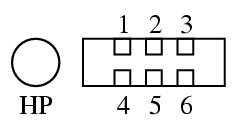
The headphone jack is a standard 3.5mm stereo, but there is also a small 6 pin
connector next to it for the "remote control" that is included in the Value
Pack. If we assume the following pin numbering (socket in the PSP as viewed
from the outside):
top row: 1,2,3 bottom row: 4,5,6
Then the pinout is as follows (tip/ring/sleeve refers to the three parts of
the stereo jack):
Pin Internal wire Function
1 Brown wire Microphone input (decouple with a capacitor against audio ground)
2 Blue wire Digital ground
3 Orange wire TXD
4 Green wire Sense? Grounding this pin wakes PSP from standby.
5 Yellow wire +2.5V
6 Grey wire RXD
Tip Pink wire Left audio
Ring Red wire Right audio
Sleeve Black wire Audio ground
The PSP communicates with the microcontroller inside the remote control using RS232 serial
communication (although the voltages are different of course, 0V and +2.5V)
using 8N1 framing at 4800bps. The protocol consists of command packages
which can be send by either the PSP or the remote control. A package is
exchanged as follows:
Sender Receiver Explanation
0xF0 Request to transmit
0xF8 Clearance to transmit
0xFD Packet starts
cmd Command code + phase
params ... Zero or more bytes of parameter data
checksum XOR of the cmd and params bytes
0xFE Packet ends
0xFA/0xFB Packet received correctly
If the packet is not received correctly, or the receiver is too busy to allow
the packet to be transmitted, the corresponding 0xFA/0xFB/0xF8 is not sent,
in which case the sender should wait a while (60 ms) and then try again from
the 0xF0. If no answer is
received in a long time (> 1s), a BREAK can be sent to reset the
communication channel, after which the state should be the same as if
the remote control had been disconnected and reconnected again.
The least significant bit of the cmd byte is the phase
indicator, which is used to differentiate a new command from the
retransmission of an old one. The first packet sent from a particular device
has phase 0 (LSB = 0), and is acknowledged with 0xFA. Then the phase is
inverted each time a new packets is sent. Packets with phase 1 are acknowledged
with 0xFB. Phase is not shared, so when the PSP sends a packet it does not
affect the phase of the remote control, and vice versa.
Note that there seems to be no particular way to know how many parameter bytes
are contained in the message, as the parameter bytes or the checksum could
contain an 0xFE as well. It is therefore necessary to know how many
parameter bytes each command takes.
The command sent by the remote control to inform the PSP of what
buttons are pressed is 0x84. It takes two parameter bytes, which if interpreted as a 16-bit integer (little endian) forms a bitfield like so:
Bit Value Button
0 0x0001 Play/Pause
2 0x0004 Fast Forward
3 0x0008 Rewind
4 0x0010 Vol +
5 0x0020 Vol -
7 0x0080 Hold
Buttons that are pressed have their corresponding bits set to 1. Buttons
that are not pressed or do not exist have their corresponding bits set to 0.
voila un CC de la page , mais prends mozilla se sera mieux pour visualiser la page ......
ou tente un copier la
A+
The headphone jack is a standard 3.5mm stereo, but there is also a small 6 pin
connector next to it for the "remote control" that is included in the Value
Pack. If we assume the following pin numbering (socket in the PSP as viewed
from the outside):
top row: 1,2,3 bottom row: 4,5,6
Then the pinout is as follows (tip/ring/sleeve refers to the three parts of
the stereo jack):
Pin Internal wire Function
1 Brown wire Microphone input (decouple with a capacitor against audio ground)
2 Blue wire Digital ground
3 Orange wire TXD
4 Green wire Sense? Grounding this pin wakes PSP from standby.
5 Yellow wire +2.5V
6 Grey wire RXD
Tip Pink wire Left audio
Ring Red wire Right audio
Sleeve Black wire Audio ground
The PSP communicates with the microcontroller inside the remote control using RS232 serial
communication (although the voltages are different of course, 0V and +2.5V)
using 8N1 framing at 4800bps. The protocol consists of command packages
which can be send by either the PSP or the remote control. A package is
exchanged as follows:
Sender Receiver Explanation
0xF0 Request to transmit
0xF8 Clearance to transmit
0xFD Packet starts
cmd Command code + phase
params ... Zero or more bytes of parameter data
checksum XOR of the cmd and params bytes
0xFE Packet ends
0xFA/0xFB Packet received correctly
If the packet is not received correctly, or the receiver is too busy to allow
the packet to be transmitted, the corresponding 0xFA/0xFB/0xF8 is not sent,
in which case the sender should wait a while (60 ms) and then try again from
the 0xF0. If no answer is
received in a long time (> 1s), a BREAK can be sent to reset the
communication channel, after which the state should be the same as if
the remote control had been disconnected and reconnected again.
The least significant bit of the cmd byte is the phase
indicator, which is used to differentiate a new command from the
retransmission of an old one. The first packet sent from a particular device
has phase 0 (LSB = 0), and is acknowledged with 0xFA. Then the phase is
inverted each time a new packets is sent. Packets with phase 1 are acknowledged
with 0xFB. Phase is not shared, so when the PSP sends a packet it does not
affect the phase of the remote control, and vice versa.
Note that there seems to be no particular way to know how many parameter bytes
are contained in the message, as the parameter bytes or the checksum could
contain an 0xFE as well. It is therefore necessary to know how many
parameter bytes each command takes.
The command sent by the remote control to inform the PSP of what
buttons are pressed is 0x84. It takes two parameter bytes, which if interpreted as a 16-bit integer (little endian) forms a bitfield like so:
Bit Value Button
0 0x0001 Play/Pause
2 0x0004 Fast Forward
3 0x0008 Rewind
4 0x0010 Vol +
5 0x0020 Vol -
7 0x0080 Hold
Buttons that are pressed have their corresponding bits set to 1. Buttons
that are not pressed or do not exist have their corresponding bits set to 0.
voila un CC de la page , mais prends mozilla se sera mieux pour visualiser la page ......
ou tente un copier la
A+
-
Arioch_76
7 messages
• Page 1 sur 1
- Forums
- L’équipe du forum • Supprimer les cookies du forum • Heures au format UTC + 1 heure [ Heure d’été ]
 SitemapIndex